Trezor Suite Review 2026: What the App Actually Does
A desk review of Trezor Suite: thirteen built-in protections, what the top fifty assets can really do in the app, the iPhone limit, and 44 third-party wallets.
Trezor Suite is the official app that drives every Trezor device (screenshot from trezor.io)
A hardware wallet is a piece of plastic or aluminium with a screen. The thing you actually look at every day is the software, and for Trezor that software is Trezor Suite - a free app for Windows, macOS, Linux, Android and iOS, with a browser version for anyone who does not want to install anything. This review is about the app rather than the devices: what Trezor Suite does, what it will and will not let you trade, and which of the three current wallets you need in order to use all of it. Trezor Suite is also the part of the system that costs nothing, which makes it the fairest place to judge the product from.
How this review was done. Every figure below was read on 3 November 2026 from pages Trezor publishes itself - the Trezor Suite product page, the supported-assets list, the third-party wallet directory, the model comparison, the shop and the returns page. Nothing here is a claim that the reviewer bought a device, funded it or traded with it. Where the company makes a claim, the sentence says so. Prices are in US dollars as the shop showed them. This article contains affiliate links: if you buy through them the shop may pay a commission, which does not change the price you pay and has not changed a single number below.
What Trezor Suite is, and what it costs
Trezor Suite is free. There is no subscription, no pro tier and no paywalled feature: the cost of the system is the hardware, and the app that drives it comes with it. You can install Trezor Suite as a desktop application or run it in a browser tab, and the same account view follows you to the phone app on Android and iOS.
The company puts two numbers on the page: more than two million customers and over ten years in bitcoin. Those are Trezor’s own figures, not independently audited ones, and they are worth reading as a statement of scale rather than as a benchmark. What can be checked is the feature list, and that is where the rest of this review goes.
The app has three jobs. It holds your accounts and shows a portfolio; it signs transactions with the device in your hand rather than with a key on your computer; and it brokers the commercial side - buying, selling, swapping and staking - through outside providers that Trezor Suite compares for you. You can see the current line-up on the Trezor site.
The thirteen protections built into Trezor Suite
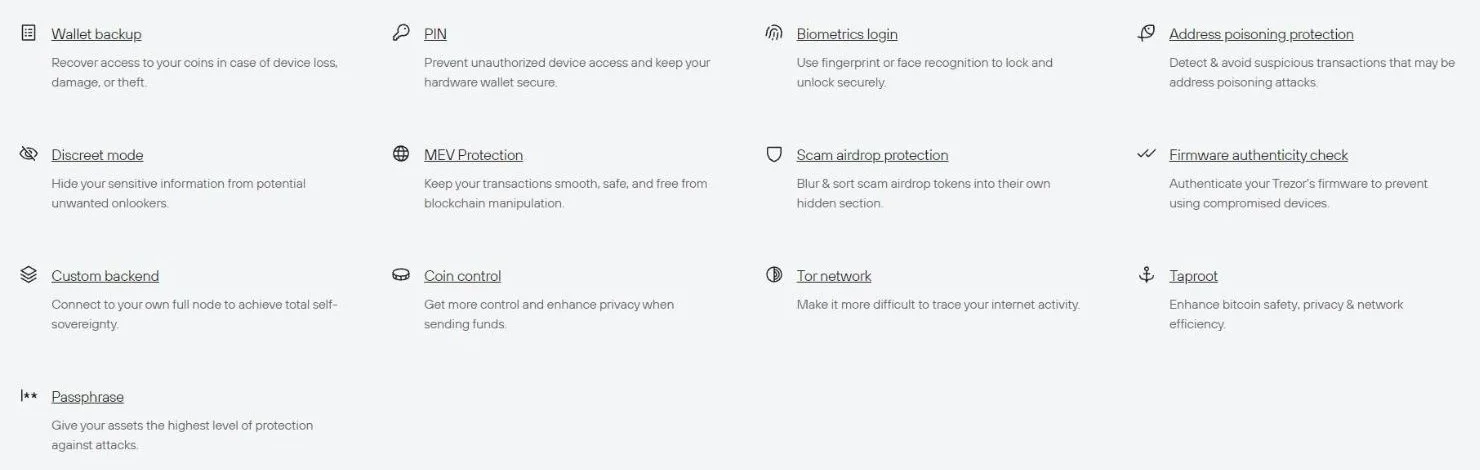
Trezor Suite lists thirteen named security and privacy features (screenshot from trezor.io)
Most wallet software advertises "bank-grade security" and leaves it there. Trezor Suite instead names its protections one by one, and once you expand the panel there are exactly thirteen of them. They fall into three groups.
Getting in and staying in - wallet backup, PIN, biometrics login, and passphrase, which the company describes as the highest level of protection available on the wallet.
Not being tricked - address poisoning protection, scam airdrop protection, MEV protection, and a firmware authenticity check that verifies the device before you trust it.
Not being watched - discreet mode, coin control, Tor network routing, Taproot support, and a custom backend option that lets you point Trezor Suite at your own full node instead of Trezor’s servers.
The last one in that list is the one that separates Trezor Suite from an exchange app. Running against your own node means the software you use to watch your balance does not have to tell anyone else what that balance is. It is a feature almost nobody uses and almost everybody should know exists.
Trezor Suite on iPhone: the line that decides your model
If you are an iPhone user, one sentence on the Trezor Suite page should decide your purchase before any other consideration does.
Trezor Safe 5, Trezor Safe 3, Trezor Model T, and Trezor Model One - Full compatibility on Android. Limited compatibility on iOS (supports portfolio tracking, buying, and receiving assets). To sign other transactions, Trezor Suite desktop is required.
Only the Trezor Safe 7 has full iOS support, because only the Safe 7 connects over Bluetooth. The company explains why in plain terms: wired accessories on iOS require Apple-specific licensing that the older models do not carry. On an iPhone with a Safe 5 or Safe 3 you can watch your portfolio, buy and receive - but to send anything you need a desktop or an Android device in the room.
Trezor also answers the obvious follow-up question about wireless. It states that both the Bluetooth and the USB-C link on the Safe 7 are secured with the Trezor Host Protocol, which encrypts every command and transaction, and that the wallet stays invisible to unknown devices. That is the company’s description of its own protocol, and it is the kind of claim a reader should file as a claim.
What the top fifty assets can actually do in Trezor Suite
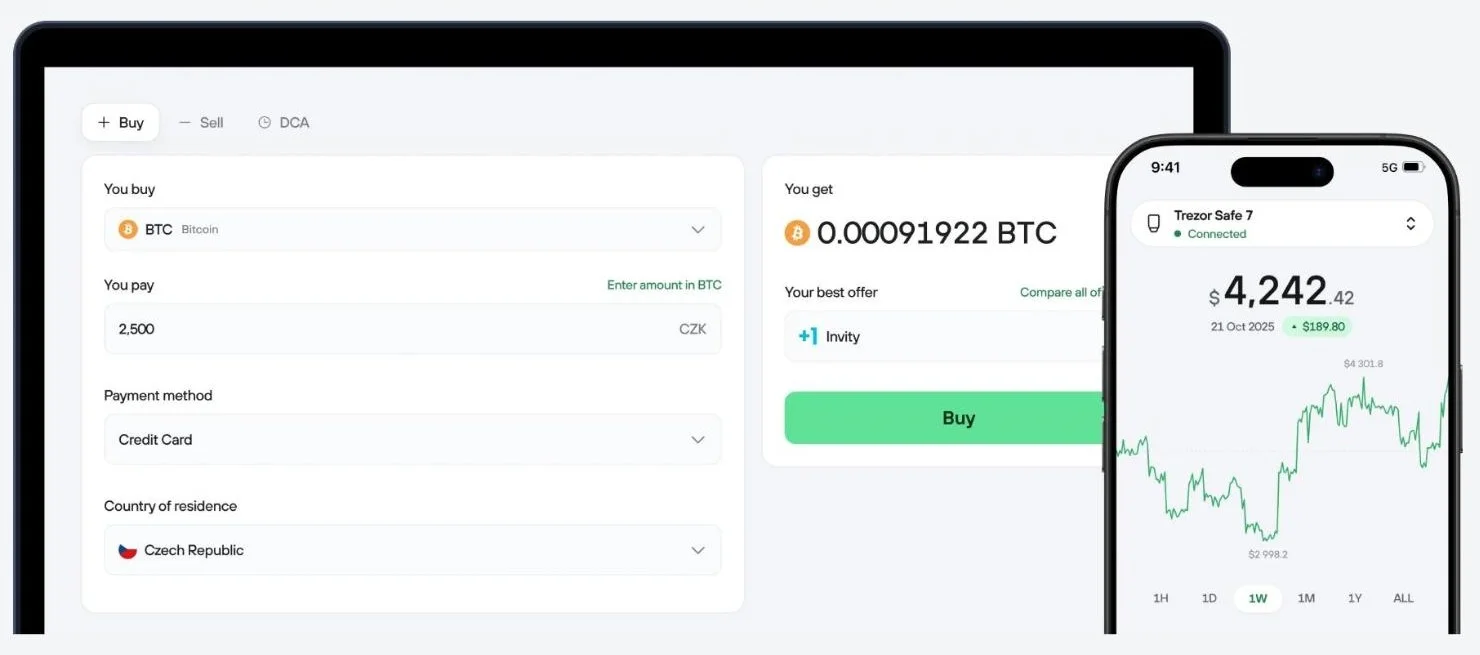
Trezor Suite compares provider quotes inside the buy screen rather than routing to one exchange (screenshot from trezor.io)
"Supports thousands of coins and tokens" is true and almost useless, because support means different things in different columns. Trezor’s own asset list has a Trade and Stake column, and reading the first fifty assets it shows gives a much sharper picture of what Trezor Suite is for.
All 50 can be sent and received. That is the baseline, and nothing in the top fifty falls below it.
17 carry the full set: buy, sell and swap.
14 are buy and swap only - you can get in through Trezor Suite but not cash out through it.
15 are swap only.
3 add staking on top of buy, sell and swap.
1 - WhiteBIT Coin - is marked "No trading" outright.
The practical reading is that Trezor Suite is a strong custody and swap tool and a selective on-ramp. Trezor Suite is built to hold and to enter, more than to exit. Nearly two thirds of the busiest assets can be bought inside the app; fewer than half can be sold there. For a long-term holder that distinction rarely matters. For anyone who expects to exit a position from the same screen they entered it, it matters a great deal, and it is worth checking your particular coin before you build a habit around the app.
Staking in Trezor Suite is three coins, not thousands
Staking is the feature most likely to be oversold by a wallet, so it is worth stating precisely. Trezor says on the Trezor Suite page that staking is "Available now for Ethereum, Cardano and Solana", and the asset table agrees with the marketing: exactly three of the top fifty assets show stake in the Trade and Stake column, and they are ETH, ADA and SOL.
Three is a small number next to "thousands of coins", and Trezor does not pretend otherwise - the sentence names the three coins rather than hiding behind a count. What makes the detail worth a section of its own is what happens when you cross it with the device column, which is the next finding.
The six assets that need the right device
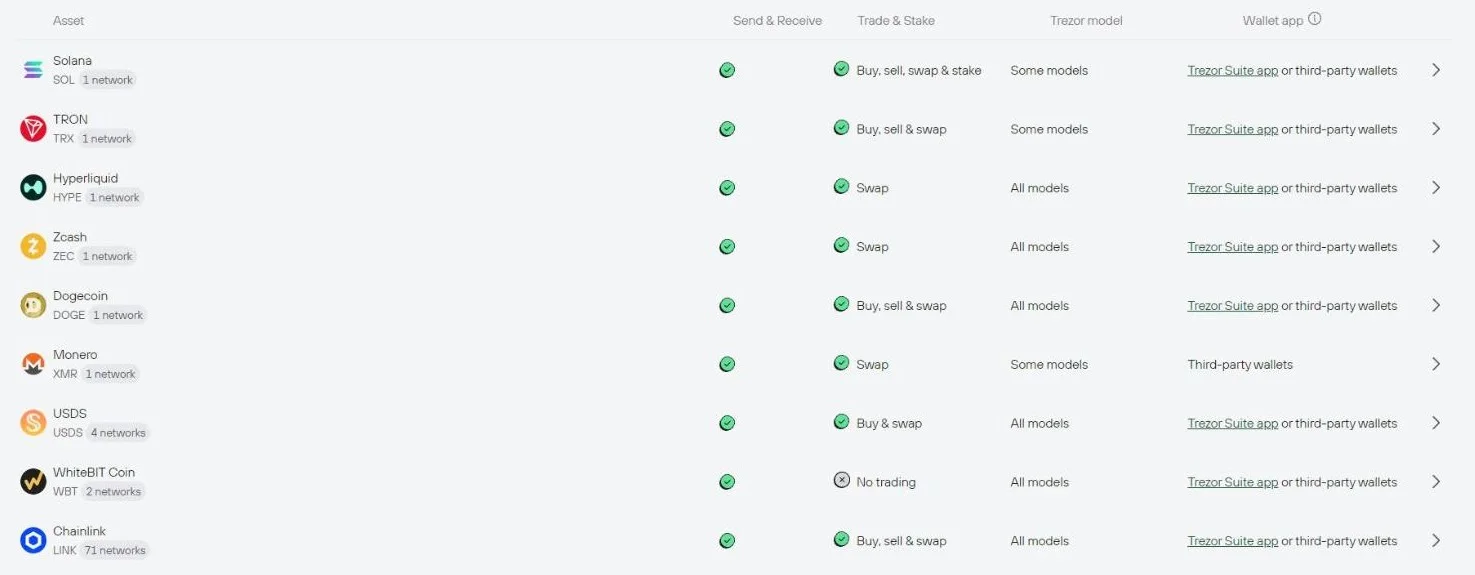
The Trezor Suite asset table marks six of the top fifty as supported on "Some models" rather than all (screenshot from trezor.io)
The comparison page says "most crypto assets are supported across all devices, with a few exceptions". The asset table puts a number on "a few": of the top fifty assets, 44 are marked "All models" and 6 are marked "Some models". The six are XRP, Solana, TRON, Monero, Cardano and PUMP.
Now line that up against the staking list. Two of the three stakeable assets - Solana and Cardano - sit inside the six. In other words, the feature Trezor Suite advertises as its yield story is also the feature most sensitive to which wallet you happen to own. If staking ADA or SOL is the reason you are buying, check the model column on the asset page before you check the price tag.
Monero is the other row worth noticing, because its Wallet app column reads "Third-party wallets" rather than Trezor Suite. Trezor Suite is honest about its own gaps, which is more than most wallet software bothers to be.
Trezor Suite is not the only way in: 44 wallet apps
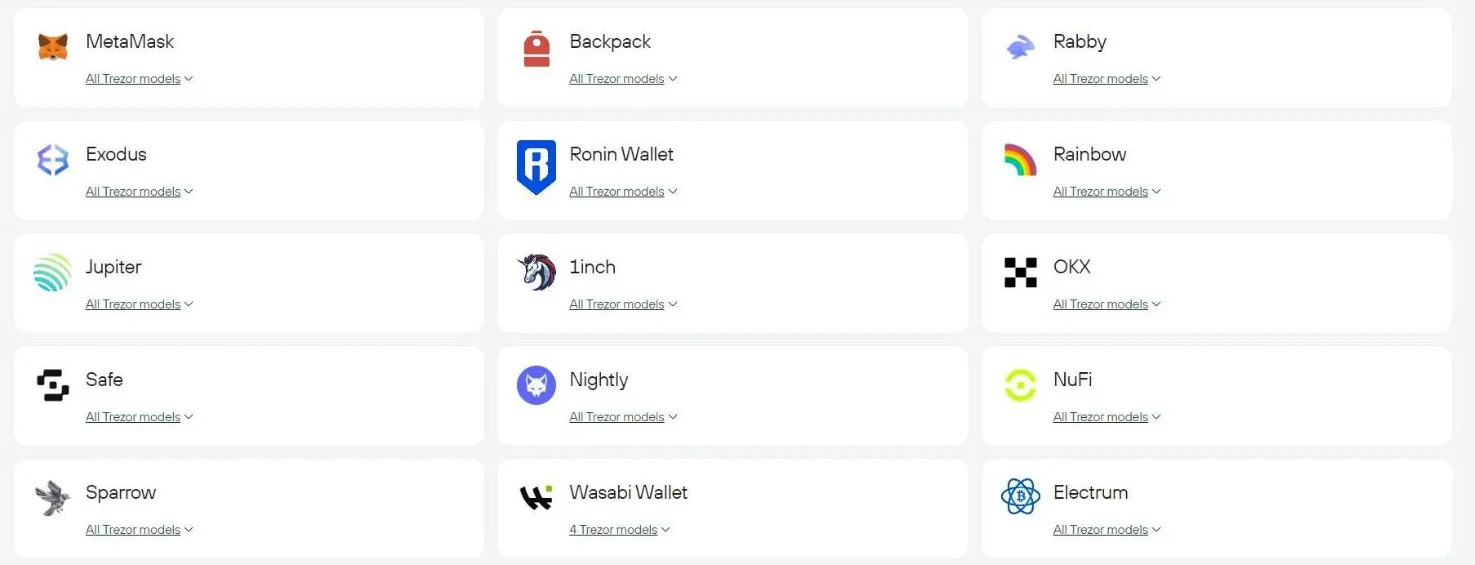
The third-party directory lists more wallet apps than the Trezor Suite page advertises (screenshot from trezor.io)
The Trezor Suite page advertises "30+ wallet apps". The directory those words link to, once every page of it is loaded, lists 44. It is a rare case of a marketing number being conservative, and it changes how you should think about the gaps in the section above: anything Trezor Suite will not do for a given coin, an outside app connected to the same device probably will.
The list runs from the obvious to the specialist: MetaMask, Rabby, Exodus, Backpack, Rainbow, OKX, 1inch, Jupiter, Safe, Nightly, NuFi, Frame, Enkrypt, Ambire and Ctrl on the general side; Sparrow, Wasabi, Electrum, Bitcoin Safe and Unchained for bitcoin; Lace, Eternl, Yoroi, AdaLite and Gerowallet for Cardano; Monero CLI/GUI and Feather for Monero; plus Casa, Theya, Bity, Pocket, Squads, MyEtherWallet and a scattering of Stellar and XDC tools.
Twenty-seven of the 44 work with every Trezor model ever made, which means an eight-year-old Model One still plugs into a modern DeFi front end. The key stays on the device either way: the outside app builds the transaction, the Trezor signs it, and Trezor Suite is simply not in the loop for that particular job.
The six apps that have not added the Safe 7 yet
Reading the same directory from the other direction produces the one number a new buyer should know: 38 of the 44 apps list the Trezor Safe 7, and six do not. They are Wasabi Wallet, MyEtherWallet, Monero CLI/GUI, BlockWallet, Stellarport and Bitcoin Safe.
Every one of those six supports the Safe 5 and the Safe 3, and most of them support the Model One and Model T as well. This is the normal lag that follows any new device: the directory is a snapshot of what third-party developers have shipped, not a verdict on the hardware. But if your workflow runs through Wasabi or the Monero CLI today, the newest and most expensive wallet is, at the time of writing, the one model the directory does not yet list for you - and the Safe 5 at less than half the price is. Both models run the same Trezor Suite app, so the choice here is about your third-party tooling rather than about features in the app itself.
Which device unlocks which part of Trezor Suite
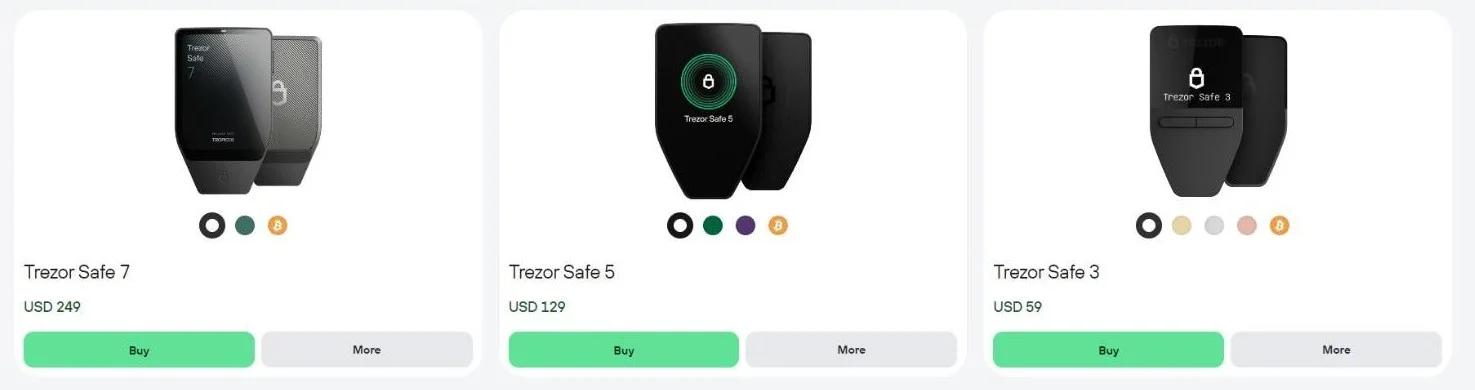
Three current models, three prices, and one app behind all of them (screenshot from trezor.io)
Here is the part Trezor spreads across three pages, gathered into one place. All prices are from the shop in US dollars.
Trezor Safe 7 - USD 249. 2.5-inch colour touchscreen at 520 x 380, premium aluminium unibody, IP54 dust and water rating, the next-generation TROPIC01 chip on top of a dual secure element architecture, quantum-ready firmware, Bluetooth 5.0+, a 3.2V 330mAh LiFePO4 battery and Qi2 wireless charging. The only model with full iOS support.
Trezor Safe 5 - USD 129. 1.54-inch colour touchscreen at 240 x 240, Gorilla Glass 3, haptic feedback, extra-durable PC-ABS body, USB-C, wired only.
Trezor Safe 3 - USD 59. 0.96-inch monochrome display at 128 x 64, two-button pad, PMMA body, USB-C, wired only.
Identical on all three - a certified EAL6+ secure element, a PIN of up to 50 digits, open-source firmware, passphrase protection, Tor routing, coin control, 12-, 20- and 24-word backups including multi-share, third-party app compatibility, buy/sell/swap/stake, and use as a FIDO2 second-factor security key.
Read that last bullet twice before you spend. The privacy and security stack inside Trezor Suite - passphrase, Tor, coin control, custom backend, multi-share backup - is the same whether you paid 59 dollars or 249. What the extra money buys is the screen, the case, the battery, the wireless link and, for iPhone owners, the ability to sign a transaction without finding a laptop. Current prices are on the Trezor store.
The bundle arithmetic Trezor does not publish
The shop sells each wallet bundled with a Keep Metal backup plate and shows a percentage badge, but it never shows the money. The badges say 5 per cent on one bundle and 10 per cent on the other two, and the arithmetic is worth doing once because it runs the opposite way to what you would expect.
Safe 7 bundle - USD 330 against USD 348 bought separately. You save USD 18, which is 5.17 per cent.
Safe 5 bundle - USD 205 against USD 228. You save USD 23, which is 10.09 per cent.
Safe 3 bundle - USD 142 against USD 158. You save USD 16, which is 10.13 per cent.
The most expensive bundle carries the smallest discount, and in cash terms the mid-range bundle beats the flagship bundle by five dollars. Nothing is hidden here - the component prices are printed on the same page - but the comparison is not made for you, and a reader who assumes bigger basket means bigger saving will assume wrong.
The backup that costs more than the wallet
One more number from the same shop deserves a sentence of its own: the Trezor Keep Metal backup plate costs USD 99 in either the 20-word or the 24-word version, while the Trezor Safe 3 costs USD 59. The piece of steel you stamp your recovery words into is 1.68 times the price of the wallet it protects.
That is not a criticism, it is the whole point of self-custody expressed as a price tag. Trezor Suite can be reinstalled in five minutes and a lost device can be replaced for 59 dollars; the twenty or twenty-four words are the only thing in the system that cannot be reissued. Accessories sit alongside it at more ordinary prices - a privacy screen protector at USD 20, a Safe 5 bumper at USD 10, a magnetic Qi2 charger at USD 29, a universal vegan-leather case at USD 39.
Buying and returning: fifteen days, and two sentences that disagree
Trezor Suite costs nothing, so the only money in this system changes hands at the shop - which makes the return terms part of the review. The window is 15 calendar days from delivery, started through a form rather than an email thread, with approved refunds processed within three to five business days of the returned item being received and inspected. Partial returns are allowed. So far, so ordinary.
The condition rule is where the same page says two different things. The return-conditions block states it one way:
Trezor wallets can only be returned if the box is unopened and all seals are intact.
The FAQ a few centimetres below states it another way:
The outer shipping box may be opened, but the device box should ideally be intact and sealed. If the device box has been opened, you can still return it - please describe the condition in the notes field.
Both sentences are live on trezor.io on the same day. The first reads as a hard rule, the second as a case-by-case review. This review is not going to pick a winner between them; the useful move for a buyer is to assume the stricter sentence applies and let the looser one be a pleasant surprise. Worth knowing too: Trezor anonymises order data after processing as a matter of privacy policy, so an older order may need extra details before support can find it, and the company states plainly that its support will never ask for your wallet backup.
How many words is a Trezor backup? Three pages, three answers
A smaller inconsistency, in the same spirit, and one that touches the first thing Trezor Suite asks you to do. Three Trezor pages describe the recovery backup and none of them uses the same list of lengths.
The comparison page - "12-, 20- and 24-word wallet backup", plus advanced multi-share backup.
The shop - "Protect your 20-word or 24-word wallet backup", adding that all Trezor hardware wallets are 20-word compatible.
The returns FAQ - "the 12 or 24 words used to secure your wallet".
The widest of the three, the comparison page, is almost certainly the complete one, and the other two are shorthand written for a different purpose. Noting all three is still the honest way to present it, and it has a practical edge: if you are buying a metal backup plate, the plate has a fixed number of slots, so check which word count your device actually produced before you order the wrong one.
Who Trezor Suite suits
Long-term holders who want privacy tools as standard. Coin control, Tor and a custom backend are in the free app at every price point. Very little consumer wallet software gives you all three.
People who want one screen for custody and trading. Buying, selling, swapping and staking all happen inside Trezor Suite, with providers compared in the buy panel rather than hidden behind one exchange.
iPhone-first users - but only with a Safe 7. On any other model, Trezor Suite on iOS is a viewer and an on-ramp, not a signing tool.
Anyone whose coin lives outside the app. With 44 third-party wallets supported, the device is useful well beyond what Trezor Suite itself handles.
Less suited to active sellers of niche assets. If your asset is in the buy-and-swap or swap-only group, your exit will happen somewhere other than Trezor Suite.
One risk note that applies to every product in this category, this one included. A hardware wallet removes the exchange from the picture, and with it the possibility of someone else freezing or losing your coins - but it hands you the whole job. There is no password reset and no support ticket that recovers a lost recovery phrase. Trezor says this plainly on its own pages, and the arithmetic in the section above is the same point in dollars.
The short version
Trezor Suite is a free, open, unusually candid piece of wallet software. It names its thirteen protections instead of gesturing at them, it puts the staking list at three coins rather than implying thousands, and it labels the six assets that need a particular device instead of burying the exception. The commercial layer is genuinely useful - 17 of the top fifty assets fully tradable, provider quotes compared in the app - and where it stops, 44 third-party wallets pick up the slack on the same key.
The things to check before you buy are all device-side, not app-side: iPhone owners need the Safe 7 to sign anything; Solana and Cardano stakers need to read the model column; Wasabi and Monero CLI users should know the Safe 7 is not in their app’s list yet. The privacy stack is identical across all three wallets, which makes the USD 59 Safe 3 a remarkably complete entry point into Trezor Suite.
Overall: 4.4 / 5. Marked up for transparency, breadth of third-party support and a free app with no feature tiers; marked down for a sell-side that lags the buy-side and for two small documentation inconsistencies that an editor should have caught. See the current Trezor range and prices here.